


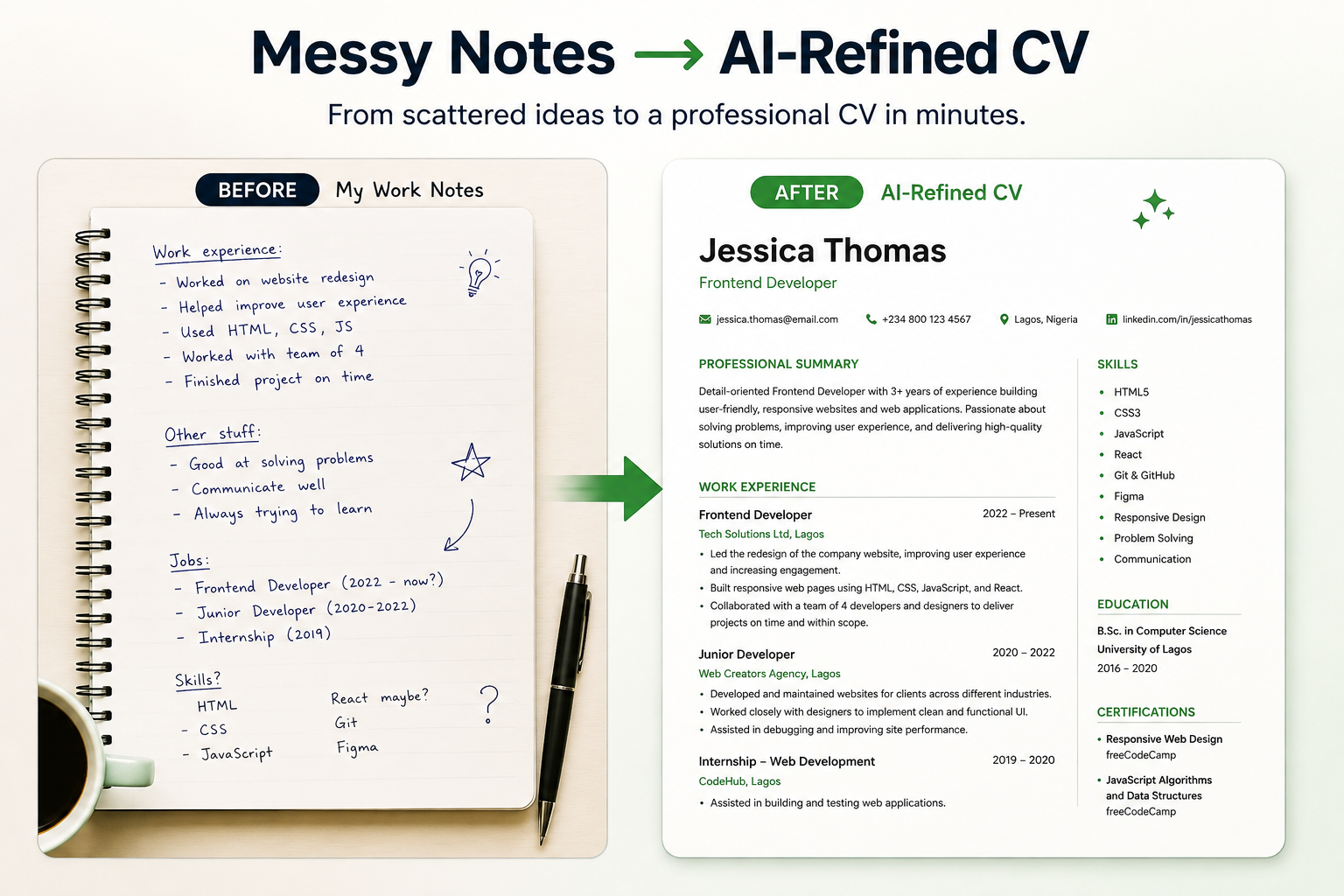
Writing a CV is one of those tasks that feels simple until you actually sit down to do it. You know your own experience, but somehow turning it into a clear, convincing document is harder than it should be.
This is exactly the kind of task AI is good at. Not because it knows your career better than you do, but because it’s good at organising, tightening, and rephrasing the parts of CV writing that usually eat up the most time.
In this guide, we’ll walk through how to use AI to build a CV that’s clear, well-structured, and tailored to the job you’re applying for, step by step.
A strong CV shouldn’t be a one-size-fits-all document. It is recommended that you tailor your CV to the specific job you’re applying for, including the skills and experience that match the role.
Why Use AI to Build Your CV?
AI won’t write your career story for you; you still need to bring the facts, the experience, and the honesty. Think of AI as an editor and formatting assistant, not a ghostwriter for your career.
Step 1: Gather Your Raw Information First
Before you open any AI tool, get your basic information down in one place, even if it’s messy. This should include:
- Your work history (roles, companies, dates)
- What you actually did in each role
- Any results or outcomes you remember (even rough ones)
- Your education and certifications
- Skills relevant to the job
You don’t need to write this well. You just need it all in one place. AI works far better when you give it real material to shape, rather than asking it to invent your experience from scratch.
Step 2: Turn Your Experience Into Strong Bullet Points
This is where AI saves the most time. Instead of staring at a blank line trying to describe what you did in a past role, describe it in plain, simple language and let AI tighten it up.
For Example:
Instead of writing:
“I was in charge of managing the team’s social media.”
You could ask AI to turn it into a CV-ready bullet point, and get something like:
“Managed social media strategy and content, growing engagement across platforms.”
Table: Before and After Examples
| What You’d Naturally Say | AI-Refined CV Bullet Point |
| “I handled customer complaints and tried to fix issues fast” | “Resolved customer complaints efficiently, improving response times” |
| “I helped organise events for the company” | “Coordinated company events from planning through execution” |
| “I did the bookkeeping for the small business” | “Managed day-to-day bookkeeping and financial record-keeping” |
Step 3: Tailor Your CV to Each Job
One of the most useful things AI can do is help you adjust your CV for a specific role, without rewriting the whole thing from scratch each time.
Paste in the job description alongside your CV and ask AI to:
- Highlight which of your skills and experience best match the role
- Suggest which sections to reorder or emphasise
- Point out any keywords from the job description missing from your CV (useful for applications that go through automated screening systems)
This step alone can make the difference between a CV that blends in and one that clearly speaks to what the employer is looking for.
Step 4: Check Clarity, Tone, and Length
Once you have a full draft, ask AI to review it for:
- Clarity – Is anything vague or confusing?
- Consistency – Same tense, same formatting style throughout
- Length – Ideally one page for early-career roles, up to two for more experienced professionals
- Tone – Confident and professional, without sounding stiff or overly formal
💡 Prompt You Can Use
“Here is my CV draft: [paste CV]. Here is the job description I’m applying for: [paste job description]. Please: 1) Rewrite my bullet points to be clear and results-focused. 2) Highlight which of my skills and experience best match this specific role. 3) Point out any important keywords from the job description that are missing from my CV. 4) Flag anything that sounds vague, repetitive, or unclear.”
This single prompt covers rewriting, tailoring, and review in one go.
A Few Things to Keep in Mind
- Don’t let AI invent achievements or experience you don’t have. Everything it writes should come from information you provided.
- Always read the final version yourself. AI can miss context only you would know.
- Keep your own voice. A CV that sounds too polished or generic can feel impersonal; usually, light editing works better than a full rewrite.
Conclusion
Building a CV with AI isn’t about handing over your career story, it’s about removing the friction of organising and phrasing it well. You bring the real experience; AI helps you present it clearly, tailor it to the role, and catch what might be missing.
Once your CV is in good shape, the next step is making sure you’re ready to talk through it confidently, which is exactly what we’ll cover in our next guide on preparing for interviews with AI.
If you’d like more hands-on guidance like this, our AI Bridge community covers practical AI skills for exactly this kind of everyday, real-world use: career tools, workplace tasks, and beyond.

1 Comment
Pingback: How to Prepare for a Job Interview Using AI (A Proper Guide) - The BridgeTechAcademy Blog