


App Platform is DigitalOcean’s Platform-as-a-Service solution—we handle the infrastructure, app runtimes, and dependencies, so that you can push code to production in just a few clicks. We recently launched Dedicated Egress features for App Platform, which allows users to route outbound app traffic through a fixed public IP that is not shared by other App Platform users or apps. This addresses a few common concerns by allowing users to:
- Create an ingress firewall rule (IP allow-list) to admit traffic from your app and your app alone. It’s generally considered best practice to secure resources (e.g. databases) by using a firewall rule to deny all incoming traffic unless it comes from a trusted IP address.
- Configure IP address-based rate limit in third-party applications.
In this blog post, I’d like to share how we implemented the Dedicated Egress feature on App Platform.
Motivation to build Dedicated Egress
Before we get into how we built Dedicated Egress, let’s review the basics of IP networks and why we wanted to build this feature. When you access any content on the internet — for example, dessert recipes — the information exchanged between your browser and the server hosting dessert recipes is broken up and sent as many small pieces of information called packets.
These packets have a source IP address and a destination IP address that determine which device within a network sent a packet and where the packet should be routed. During a packet’s journey between client and server, its source IP address can change as it travels between networks. The source IP address is a public IP when the packet is sent between two internet-connected networks. When this blog post mentions source IP addresses, we’re referring specifically to the public source IP of packets sent across the internet.
Running a bit further with this contrived scenario, you decide to spend less time browsing for dessert recipes and more time making desserts. Your time-saving solution involves running an app on App Platform that automatically downloads and indexes recipes from the internet. Just like internet traffic generated by a browser, app network traffic has a public source IP address. Now let’s understand where an app’s public IP address comes from and the challenges that App Platform users faced prior to this feature.
App Platform runs atop Kubernetes, which means Kubernetes handles the scheduling and management of apps across a large pool of worker nodes. Each worker node in a cluster is assigned its own public IPv4 address. Having a public IP address means the workers can connect to the internet and talk to other internet-connected devices. We call this network traffic “egress traffic” because it leaves the data center hosting an app. When an app is deployed on App Platform, Kubernetes decides where to place that app’s container(s) within the worker pool. Without the dedicated egress feature enabled, the source IP of egress app traffic is the public IP address of the Kubernetes worker running that app instance, shown below.
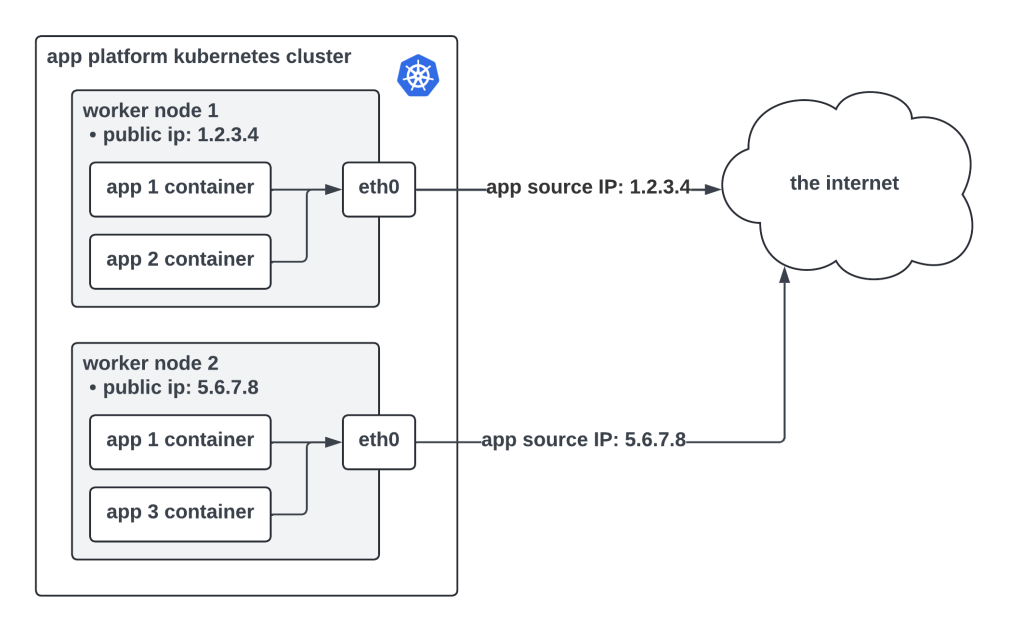
This presents some security challenges, especially to users who need to connect their apps to firewall-protected resources running outside DigitalOcean.
- App Platform is multi-tenant. One Kubernetes worker node can (and usually does) host several apps that belong to different users. Apps running on a given worker node all share the same public IP address. By opening a firewall rule to admit traffic from an app based on its public IP address, that firewall is open to every app running on a particular worker node. In the diagram above, there are two instances of app 1 running on separate nodes. The public IP for app 1 is shared by app 2 and app 3. An ingress firewall rule that allows traffic from app 1 would allow traffic from app 2 and 3 as well.
- An app’s public IP address is not fixed. When you redeploy an app, its public IP address can change because Kubernetes is likely to schedule that app on a different worker node that has a different public IP address. Users maintaining a firewall would need to update an allow list every time their app is deployed, which is a painful experience. This is also not recommended due to the multi-tenancy reason mentioned above.
We built Dedicated Egress to help solve these problems. By enabling this feature, an app is assigned its own set of fixed public IP addresses that belong solely to the app.
